
Last version of WampServer offer easy upgrade from PHP 5.x version to PHP 7.x. Let see in details how to change PHP version in WAMP.
Assume you already using last version of Wamp server on your local machine. If not please research following resource : www.wampserver.com
- Navigate to Wamp icon in bottom right toolbar and click on it.
- Go to PHP -> Version
- You can see selected sign on current version of PHP(in our case 5.6.25).
- Click on 7.0.10
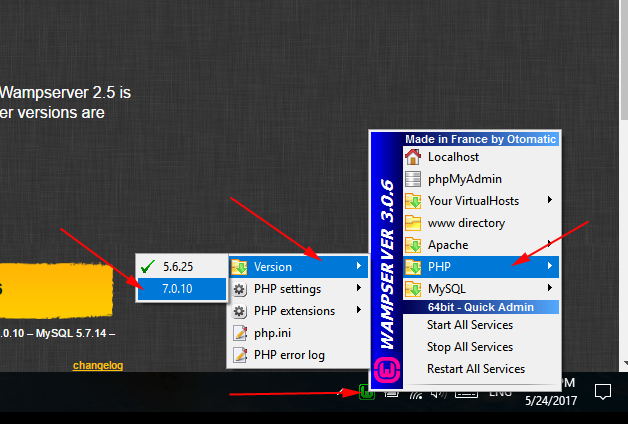
- The Wamp server will be rebooted for some time. The color of Wamp icon will be changed from red to yellow, and to green.
- Go back to PHP -> Version and you can see the sign of version has been changed to 7.0.10

- For more information you can navigate to You VirtualHost -> localhost

- The new window with WampServer information will open. You can verify what version of Apache, PHP and MySQL the system using now.
- Also there are useful installed Tools on this page, like phpinfo() or phpmyadmin
- Click on phpinfo()
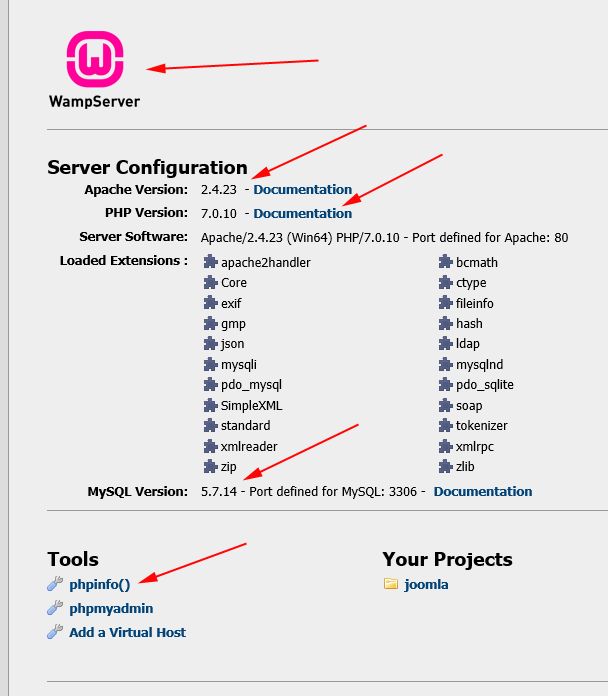
- This page has full information about PHP, Apache, MySQL configuration.

